| You are in: Observing Tool (OT) > Science Program > Elements > OT Components and Iterators > OT TEXES |
|
TEXES in the Observing Tool |
Observations with the TEXES instrument are taken somewhat differently than those of the regular Gemini instruments. The OT files for TEXES observations are rather simple and are used only for two purposes: first, they define the target position and the guide star; second, they indicate various basic items of the TEXES configuration (the cross-disperser, the total requested length of the observation, the slit orientation, the central wavelength).
This page guides you through the main steps and considerations for configuring TEXES observations in the Observing Tool:
Refer to the TEXES instrument pages for further details of the instrument capabilities.
Further details on general (non-TEXES-specific) OT components can be found on the general OT web pages where an OT tutorial is also available.
The detailed component editor for TEXES is accessed in the usual manner, by selecting the TEXES component in your science program, and is shown below:
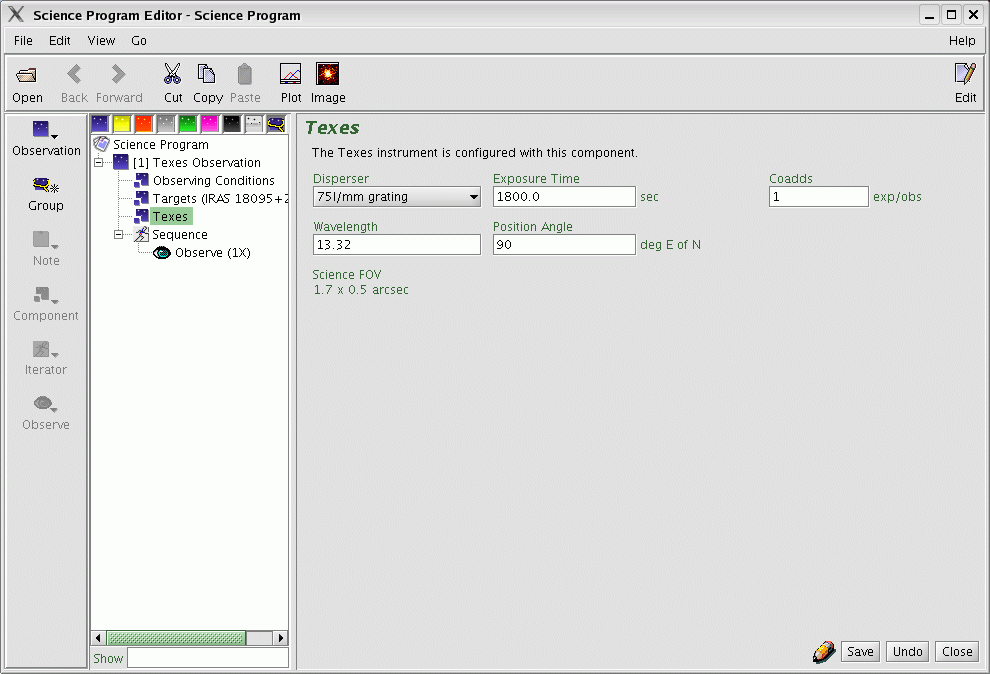
There is a choice of the cross-disperser to be used with TEXES, which determines the spectral resolution at any given wavelength. The two choices are the 75 lines/millimeter grating or the 32 lines/millimeter echelle. The former gives the better spectral resolution but the slit length is shorter than for the other mode. PIs need to define which of these two is to be used.
The total time to be spent observing the target object should be defined. The details about how this total exposure time will be achieved are determined at the telescope depending on the conditions, and need not be of concern to the PI. The PI only defines the total on-source time.
The PI also need not worry about defining the intervals for nodding along the slit in the normal spectroscopy mode. This also will be determined at the telescope by the TEXES team.
While there is a field for the number of exposures per observation, this also is not normally set by the PI and should be left as 1. The total exposure time (for example 1800 seconds as above) should be entered with 1 exposure.
The central wavelength for the observation needs to be set for each observation. There is no iterator component for TEXES, if you need many wavelengths for a given target then you can either define separate observations for each wavelength (if the individual observations are fairly long) or list the wavelengths in a note in the program (where the individual observations are short). In the latter case then please indicate the total observation time for all wavelengths in the requested exposure time.
The facility Cassegrain Rotator can rotate the instrument to any desired angle. The angle (in conventional astronomical notation of degrees east of north) is set by typing in the "position angle" window. The view of the science field in the position editor will reflect the selected angle. Alternatively the angle may be set or adjusted in the position editor itself by interactively rotating the science field.
The save button accepts the latest changes and stores the program to the local database on your hard disk, the undo/redo button (and, transiently, the edit pencil) toggles pending and saved changes and the close button closes the science program editor (saving any changes to the local database). Note that none of these actions affects the version of your program in the Gemini observing database; that version is only updated when the program is stored to the database.
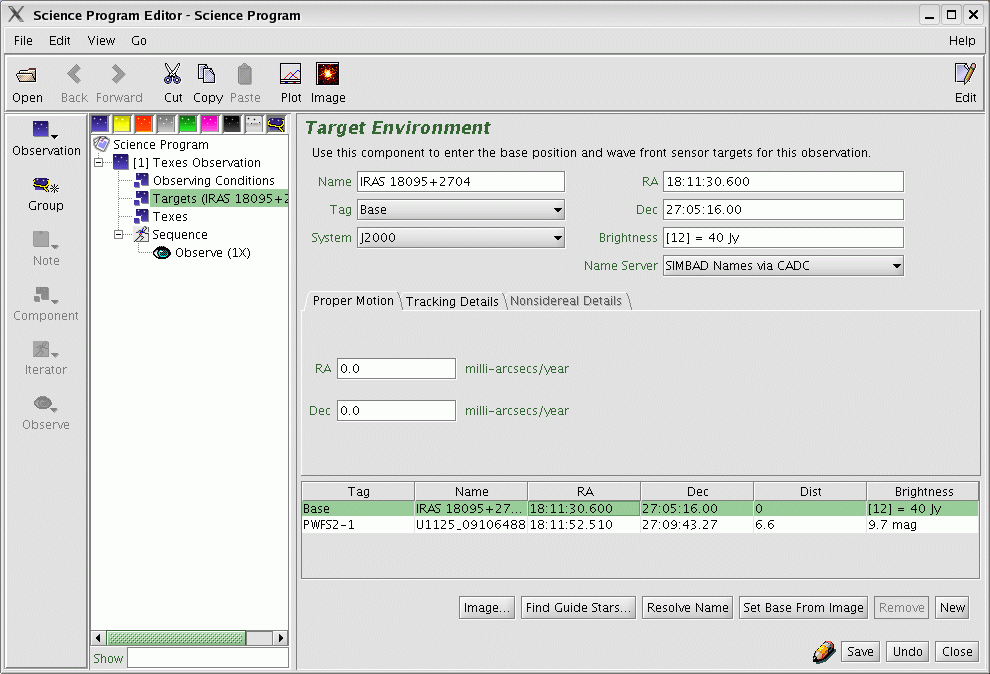
A peripheral wavefront sensor (PWFS) guide star must be defined for all TEXES observations. Guide stars must have certain attributes: they must be real, single, point sources (not galaxies, double stars or diffraction spikes around bright stars, for example; the guide star catalogues contain many such objects), be brighter than about 14th magnitude, and be within the 7" radius area accessible to the PWFS without the PWFS probe arm vignetting the science field of view. Guide stars are usually acquired using a red filter, so magnitudes as close as possible to R band are most relevant (other filters can be used if e.g. the only available guide star is very blue; in cases like this please alert your NGO/contact scientist at phase II). TEXES has no on-instrument wavefront sensor, and PWFS2 is routinely used for all observations. You can find guide stars by clicking on the "guide stars" icon at the top of the position editor. Alternatively, the catalogue navigator, accessed via the "catalogs" icon at the top of the position editor, can be used to show names, locations, colours and magnitudes of potential guide stars.
As the TEXES field of view is small guide stars can be selected down to a radius of 4.3". Guide stars also should not be beyond about 6.85" since there may be problems using a guide star that is right on the edge of the PWFS patrol field. If no suitable guide star is available between these limits it may be possible to use a guide star slightly closer in, but if the "shadow" for the PWFS comes close to the slit as drawn then there may be problems. In these cases, discuss the matter with your contact scientist.
There is also a bright limit for PWFS2 stars. If the star chosen happens to be brighter than about magnitude 9 then another guide star should be selected.
The magnified view at the upper right should be used to check for double guide stars (potato-shaped stars and >1 star of similar brightness within the PWFS FOV); the SIMBAD catalogue can also be used for this purpose.
It is generally useful to indicate the target brightness near the wavelength of interest to aid in acquisition of the correct object.


Last update October 3nd, 2006; Kevin Volk